

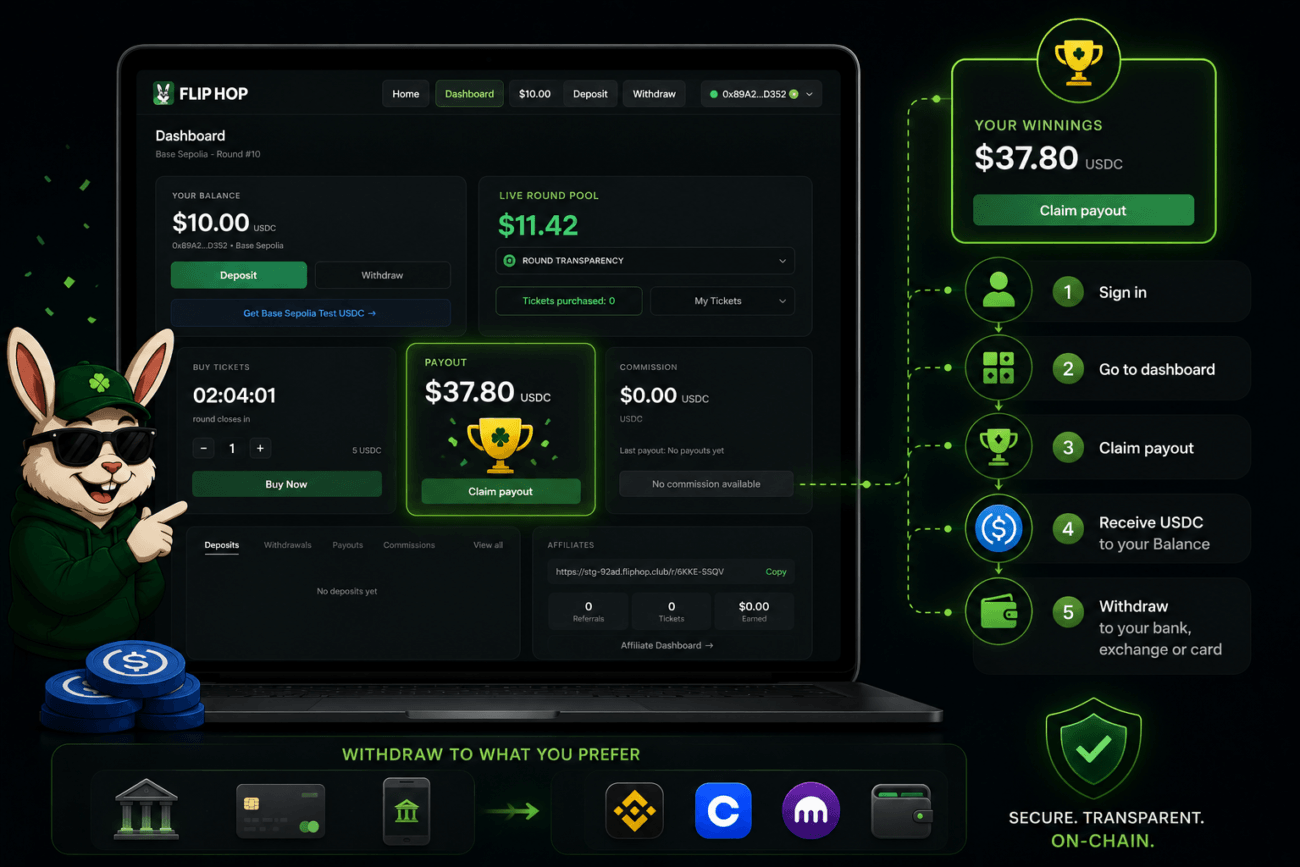
If you’re the selected winner of a Flip Hop round, your payout is ready to claim in your dashboard. Here’s exactly how to withdraw it — and what your options are.
How Do I Know If I Won?
After a round closes at 00:00 UTC, the result is posted. If you are the selected winner, your dashboard will show a payout available for claim. There is no automatic transfer — you need to withdraw it yourself.
How Do I Withdraw My Winnings?
- Sign in to Flip Hop
Access your account using Google or your connected wallet.
- Go to your dashboard
The payout section will show your available winnings.
- Click “Claim payout”
Confirm the action through the platform flow.
- Receive your USDC
The USDC is sent directly to your Balance (wallet).
- Withdraw your Funds
Send funds directly to your wallet or exchange account.
Remember: you can send your earnings to an exchange and, from there, withdraw them to your bank account.
Is There an Expiry on My Payout?
No. Your payout stays available in your dashboard until you choose to withdraw it. There is no claim expiry.
Can I Withdraw to a Bank Account?
Yes, you send your earnings to an exchange and, from there, withdraw them to your bank account.
Can I Withdraw to an Exchange?
Yes. You can send your funds on an exchange such as Binance, Coinbase, or Kraken.
You can withdraw directly to your exchange deposit address. Make sure to:
- Use the correct deposit address from your exchange
- Confirm the exchange supports the Base network for USDC
- Double-check all details before confirming
Note: you can send your earnings to an exchange and, from there, withdraw them to your bank account.
Does Flip Hop Charge a Withdrawal Fee?
No. Flip Hop does not charge its own withdrawal fee. You may still pay standard Base network gas fees, and third-party providers may apply their own fees.
What If My Withdrawal Is Delayed?
Delays can happen due to:
- Blockchain network congestion
- Exchange processing time
- Provider review
- Identity or eligibility verification
- Incorrect destination details
If your withdrawal is taking longer than expected, contact Flip Hop support with your wallet address, transaction hash, and a description of the issue.